
Certificates for Life Events
Sunergo’s new tool lets you generate certificates for the special moments you celebrate. Certificates are a meaningful way to celebrate and acknowledge:
- Sacraments (Baptism, First Communion)
- Program completions (Sunday School, VBS, Bible studies)
- Milestones (Membership, dedication, volunteer recognition)
- and more!
Certificates are a free add-on to Sunergo Church. To enable this feature, please contact Sunergo Support.
How It Works
- Open Sunergo Church and go to Contacts > Life Event Certificates.
- You will see a list of life events with certificates.
- Select View Template to see how the certificate will look.
- Select Generate Template to generate certificates.
To add or change which certificates should belong to which life event, please contact Sunergo Support.
Templates
Sunergo provides 3 standard templates when you enable Life Event Certificates:
To explore a custom certificate template, including changes to the information displayed on the certificate, please contact Sunergo Support for details and pricing.
Previewing Templates
When previewing a template, placeholders (e.g., {{ Full Name }}) will be shown. These placeholders will be replaced by each contact’s personal information and life event information during certificate generation.
Generating Certificates
Before generating certificates, you will need to add a life event to each contact that you would like to generate a certificate for. Learn more about how to add life events.
- Select Generate Certificates for the life event you would like to generate certificates for.
- Enter the date range for when the life events occurred, then select Find Contacts.
- To select a single date, set both From and To to the same date.
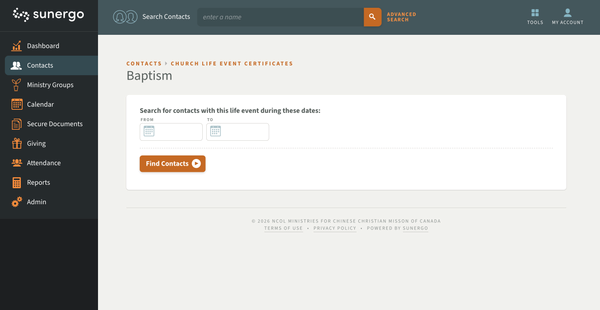
- To select a single date, set both From and To to the same date.
- Select the checkbox for the contacts you would like to view or print certificates for, then select Generate.
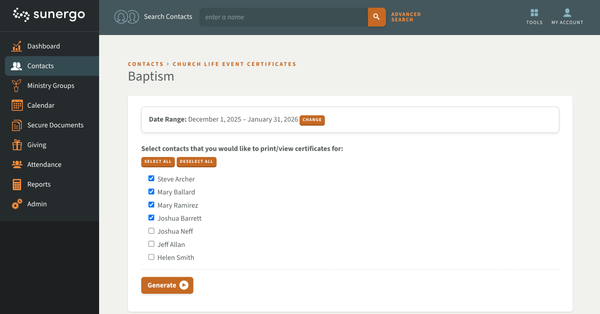
Certificates will be generated as a PDF for easy viewing, saving and printing.
Related Articles
Couldn't solve the problem?
Monday – Friday
8:00am to 4:30pm (Pacific Time)
(Closed Statutory Holidays)